
IHOS Chat SMS
SMS Opt-In Process
This page documents the authenticated, affirmative consent flow used for IHOS Chat SMS. IHOS does not use a text-message keyword as an initial opt-in method.
Web opt-in form
1. Sign in
The recipient signs in with an active IHOS account at the IHOS Ops Portal or in IHOS Mobile. Only authorized personnel can reach Chat settings.
2. Open SMS Settings
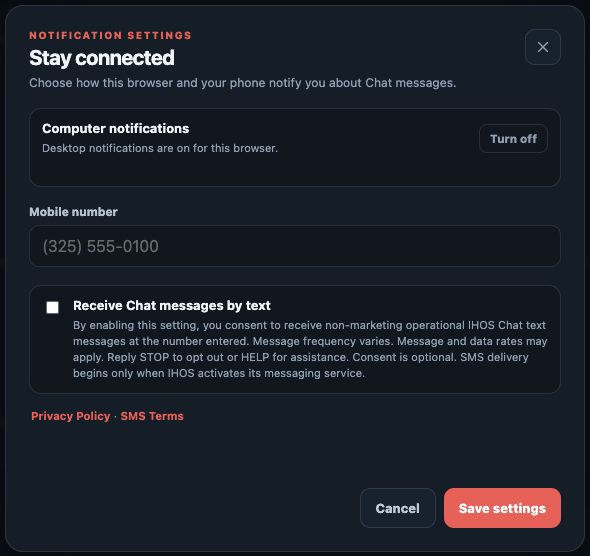
In Chat, the recipient opens Notification or Text Message Settings and enters a mobile number they control.
3. Affirmatively enable SMS
The separate "Receive Chat messages by text" control is off by default. The recipient must turn it on and select Save settings. Consent is not bundled with another agreement.
4. Consent is recorded
IHOS records the normalized mobile number, enabled preference, and opt-in timestamp. No SMS is sent before the recipient completes this flow and IHOS activates the messaging service.
Disclosure shown before saving
By enabling this setting, you consent to receive non-marketing operational IHOS Chat text messages at the number entered. Message frequency varies. Message and data rates may apply. Reply STOP to opt out or HELP for assistance. Consent is optional.
The settings screen also links to the Privacy Policy and SMS Terms before the recipient saves.
Withdrawing consent
A recipient may disable the same SMS setting at any time or reply STOP to an IHOS text. Reply HELP for assistance. Re-enrollment requires the recipient to repeat the affirmative authenticated opt-in flow.
Assistance
For help with SMS consent or opt-out, use the support details below.
- Company
- Industrial Hose and Oilfield Supply
- [email protected]
- Phone
- +18062402444